Photo to Story Generator
Upload a photo and let photo to story AI create a complete narrative in seconds. Turn family photos, travel shots, and memories into readable stories.
Click to upload or drag and drop
PNG, JPG, GIF up to 10MB
A photo file is required. Your photo is sent only for analysis and is not added to a public gallery.
Upload a photo first. You can edit this confirmation so the story matches what you see.
Review the editable description above; the story will avoid contradicting confirmed details.
Leave blank for the generator to choose.
Comma-separated; helps the photo to story generator focus.
Please sign in to use this photo to story generator.
First-time visitors can generate 1 result for free, no sign-in required. Credits are only needed after the free trial.
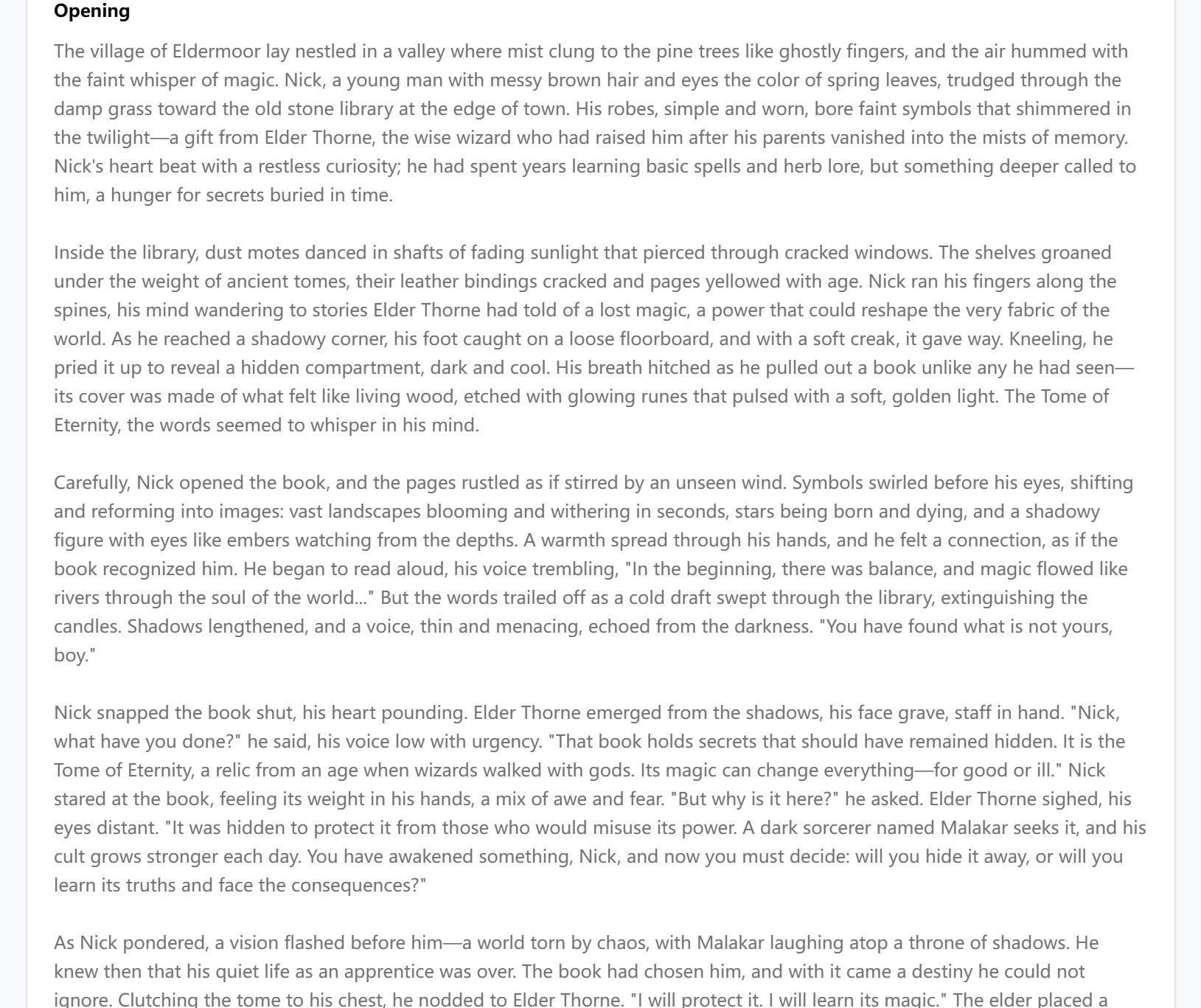
This sample shows the output style and structure this tool can generate.
Move this result into the next focused tool instead of starting over.
How the Photo to Story Generator Works
Upload a photo, set an optional genre, and get a complete story in one run.
Upload a photo
A real photograph is required. Family snapshots, travel shots, and memories all work.
Set genre and details
Add an optional genre and visual elements to guide tone and focus.
Generate and read
Click Generate Story from Photo and get a complete narrative in seconds.
Why Choose This Generator
Photo to story generator for real photos
Upload a snapshot and let AI read the people, place, and mood before writing the narrative.
Upload AI analysis
The image is analyzed so the story matches what's actually in your picture, not a generic caption.
Editable photo confirmation
After you upload, you can confirm people, place, and mood so the story matches the photograph.
Copy and expand
Save the result, then develop it into a longer multi-chapter version with the full story generator.
Who It Is For
Families preserving memories
Turn a reunion, birthday, or holiday snapshot into a story you can keep and share.
Travelers and hobby photographers
Make each landmark or street scene the opening of a short adventure.
Scrapbookers and gift-makers
Pair a favorite picture with a custom narrative for a personal, one-of-a-kind gift.
Turn a Photo into a Story with AI
Photo to story AI reads what is in your uploaded photograph — people, places, light, and mood — then writes a complete narrative around it. Upload a family snapshot, travel photo, or pet portrait. This page is built for real photographs, not artwork described in words. Note the difference: if you want to turn a described scene or artwork into prose — without uploading a file — the image to story generator is the better fit; this page analyzes the actual photographs you upload.
- Upload a real photo so the tool can analyze the scene
- Let the AI read people, place, light, and mood before writing
- Generate a complete narrative around a family or travel snapshot
How to Create a Story from a Photo
To create a story from a photo, upload the file so the tool can analyze people, light, and mood. Add optional genre and visual keywords so the AI matches tone and focus. The tool then generates a story with characters, conflict, and an ending.
- Upload a real photo before generating
- Add genre and visual keywords to steer tone and focus
- Get a story with characters, conflict, and an ending
Make Stories from Your Photos: Ideas and Examples
Make stories from photos you already have on your phone or album. Family reunions become warm character-driven tales; beach sunsets become adventure or romance openings; old childhood photos become nostalgic coming-of-age scenes. Pet photos work well for humorous or heartfelt shorts, and travel albums become episodic adventures.
- Turn reunions into character tales and sunsets into romance openings
- Use old childhood photos for nostalgic coming-of-age scenes
- Pair two related pictures to build before-and-after narratives
Picture to Story: What Photos Work Best
Photo to story results improve when the photo has a clear subject, visible emotion, and context the AI can infer — a person reacting, a dramatic landscape, or a moment mid-action. Avoid blurry or dark shots when possible. Portraits, travel scenes, and candid moments all work.
- Choose photos with a clear subject and visible emotion
- Prefer moments mid-action the AI can infer context from
- Skip blurry or dark shots when you can
Family Photo Stories
Turn family photos into stories that preserve memories. Upload a reunion, birthday, or holiday shot and let AI weave characters and emotion from the scene.
Travel Photo Tales
Create travel photo tales from landmarks and street scenes. Each picture can become a standalone adventure or the opening chapter of a longer trip narrative.
Pet & Everyday Moments
Picture to story works for pets, hobbies, and daily life. Simple, expressive photos often produce the most readable AI narratives.
See What It Creates
A complete story written around your photo, with characters, conflict, and an ending.
Frequently Asked Questions
Explore More Story Tools
Full AI Story Generator
Develop your photo-based story into a multi-chapter full novel with three AI versions
Full AI story generatorFantasy Story Generator
Create fantasy narratives when your photo inspires a magical or epic storyline
Fantasy story generatorReady to Turn Photos into Stories?
Upload a photo and get a complete story in seconds, with 20 free credits on signup.












































 Featured on AI Ranking










 Just Hunt